Team guide · 6 min read
Grant-funded projects: clear team time reporting with Minuttio
Received a grant, subsidy or organisational funding? See how Minuttio helps your team collect project hours, review shared work and prepare clearer reports.
Winning funding is the beginning, not the end of the paperwork. A government grant, foundation award, organisational subsidy or development fund may require your team to explain who worked on the funded project, what they did and how many hours belonged to it. The challenge is not only adding up time. It is collecting useful records while the work is happening, rather than reconstructing weeks of activity just before a reporting deadline.
The funder needs a project story, not a loose total
For a research team, a community association, a cultural organisation or a funded small-business project, the same practical questions recur: which project did the work support, which reporting period does it belong to, and how does it connect to the agreed activities? Start with the funding decision. Check the required level of detail, eligible work, reporting dates, sign-off process and record-retention period. Some programmes reimburse actual personnel costs, some use unit costs and others use lump sums. Do not assume that every grant requires the same timesheet.
Give each funded project a clear home
Create a Minuttio project using the name or reference from the funding decision, then link the relevant tasks to it. Use clear task names such as “WP2: deliver community workshop” instead of “miscellaneous”. Subprojects and subtasks can organise work packages when that matches your reporting structure. Assign shared work to the people doing it. This puts the activity and its hours together, so a project lead can connect the time to an actual deliverable rather than a separate spreadsheet label.
Collect time as you work, including work away from the desk
Start the task timer when work begins and stop it when you finish or switch activities. Repeated sessions accumulate on the task, so preparation, delivery and follow-up need not be squeezed into one remembered entry. For fieldwork, events or a forgotten timer, add manual hours with the actual work date. Minuttio works in the browser, including on a phone. A short description of the work makes the number useful later. Keep undated manual balances separate: without a work date, they cannot reliably support a weekly reporting period.
A reusable grant-reporting template in Reports
Minuttio’s grant-reporting template turns dated work records into a project-hours report. Save the funding details once and reuse the template for each reporting period. Hours are grouped by project, employee and work category within the chosen funding and reporting dates, with separate timer hours, dated manual hours and totals. Project and employee subtotals, activity references and an optional daily work-detail appendix help explain what the hours supported. This is a configurable supporting report, not a replacement for a funder’s mandatory form.
What the template includes
Include the recipient organisation, funder, grant identification code, funding decision reference, report contact and report reference. Set the funding period, reporting dates and reporting timezone. For each project, record its internal name, members, lead, approver, work package and activity reference. Choose which fields are required and add labelled custom fields for your funder’s requirements, such as a programme name. Project roles are declarations printed on the report; they do not grant permissions or prove approval. The fictional field values below show how one saved template could be filled in.
How to prepare, print and reuse your report
Open Reports and find Grant reporting. Create or load a template, select the projects and set a reporting range within the funding period. Narrow the report by employee, work category, timer or dated manual source, and current task review status; add the work-detail appendix if required. Assign multi-project tasks to one reporting project so the same work is not counted twice. Prepare the preview and review missing required fields, invalid entries, undated balances and unallocated tasks before printing. Print the chosen snapshot or use your browser’s Save as PDF. Save a private archived copy and, if applicable, mark it PDF, sent or printed: these are your own declarations, not proof of delivery. Load the template again for the next period. Only authorized timer records and your own dated manual entries are available; other employees’ manual hours are not included. Task review status is current, not historical approval of each hour. Check coverage and your funder’s rules before submitting.
A fictional funded-project report
Community Skills Lab is an imaginary project. This mock-up shows the reusable grant-reporting template with fictional data for 2 to 6 November 2026: 84 hours, split into 60 timer hours and 24 dated manual hours. It illustrates a complete reporting dataset, not the records available to any particular account. Actual reports include only authorized records; other employees’ manual hours are not available. A submission may also need payroll evidence, signatures or the funder’s own form.
- Recipient organisation
- Community Skills Association (fictional)
- Funder
- Example Community Fund (fictional)
- Grant code / decision reference
- DEMO-2026-014 / DEMO-DECISION-2026-014
- Report reference
- DEMO-NOV-2026-01
- Funding period
- 2026-01-01 / 2026-12-31
- Reporting period / timezone
- 2026-11-02 / 2026-11-06 (Europe/Helsinki)
- Internal project name
- Community Skills Lab
- Project members
- Aino Example, Mika Example, Sara Example
- Project lead / report contact
- Aino Example
- Project approver (declaration)
- Alex Example
- Funding programme
- DEMO Skills 2026
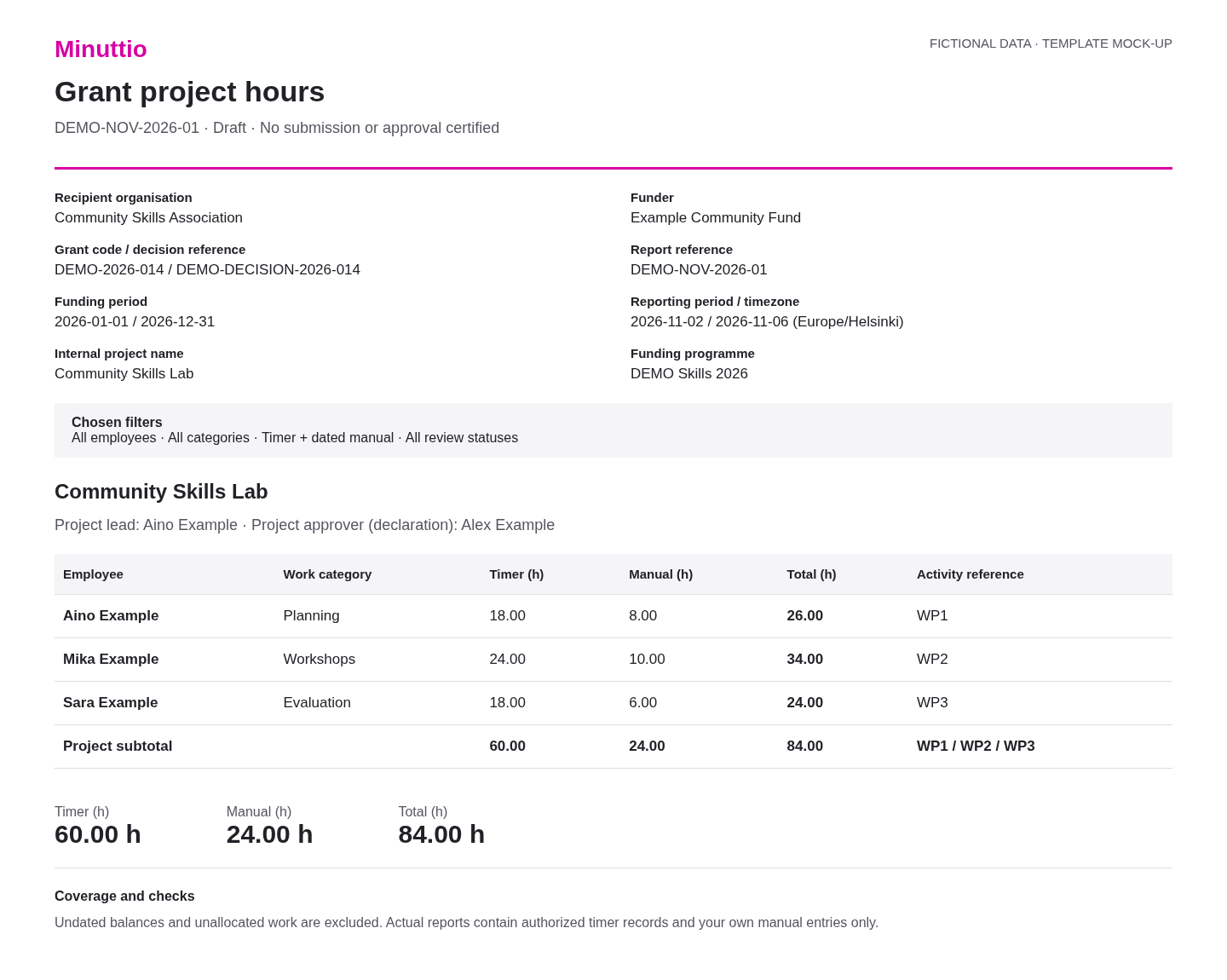
| Activity | Team member | Timer | Dated manual | Total |
|---|---|---|---|---|
| WP1: Planning | Aino Example | 18 h | 8 h | 26 h |
| WP2: Workshops | Mika Example | 24 h | 10 h | 34 h |
| WP3: Evaluation | Sara Example | 18 h | 6 h | 24 h |
| Total | 60 h | 24 h | 84 h | |
Review shared work before the deadline
Team members can mark shared tasks done; an existing team approver reviews them under Team → Timesheet approval. Approval history records who approved or rejected the timesheet and when. Pending-approval reminders help keep that queue moving, and an unavailable approver can hand pending reviews to another existing team approver. This supports an internal review routine. It is not an electronic signature on a funder’s official form, and approval does not certify that every claimed hour is eligible.
Turn records into a report, not another retyping exercise
Grant reporting uses actual dated work rather than task scheduling dates. Timer sessions are split at midnight in the chosen reporting timezone, and manual entries follow their recorded work date. The printable preview keeps your chosen filters and totals together. Other Reports tables offer their own supported CSV or PDF exports, while the personal Google Sheets integration can export your own tasks or logged sessions to a new spreadsheet. These are separate tools, not automatic exports of the grant template or other members’ private records. Choose the supporting records your funder needs and transfer figures to its official form where required.
Why this helps a funded team
The benefit is a smaller reporting gap between doing the work and explaining it. People record time against the work they already recognise. Project leads can spot missing dates, unclear activities and pending reviews earlier. Finance colleagues receive a reusable export instead of disconnected messages, while visible hours help the team notice an activity taking more time than planned. This can reduce last-minute chasing and make discussions with the funder clearer. It does not promise a particular time saving, reimbursement or audit result.
Keep the funding rules in charge
Minuttio supports collecting and organising evidence; it is not a grant-management portal or a guarantee of compliance. Do not put a grant amount into billed revenue simply to make a report look complete. Personnel-cost claims may need payroll records, an approved calculation method and documents outside Minuttio. Where work supports two funded projects, split the time into separate tasks or dated entries according to the approved allocation method. A task linked to multiple projects may appear in full in each project breakdown: those totals must not be added together as if they were distinct hours. Save dated exports and supporting records outside Minuttio for the required retention period, and check task archiving and deletion settings rather than assuming the live workspace is a permanent archive.
Grant-reporting FAQ
- Which details should a grant report include?
- Start with the funding decision: organisation, funder, grant code and decision reference, funding and reporting dates, project, employee, work category, activity description or reference, dated hours and report contact. Include project leads and approvers where required. Your funder decides the final requirements.See the template fields
- How do I adapt the template for different funders?
- Save a separate template for each grant or reporting structure. Choose required fields, add labelled custom fields such as programme or cost-centre codes, and match project names, work packages and activity references to the funding decision. Set the period and timezone, then select employee, category, time-source and review filters. Add the daily work-detail appendix if the funder needs entry-level evidence.Required and custom fieldsFilters and template reuse
- Does the report include every team member’s hours?
- Not automatically. Timer hours include only records you may read; dated manual hours include your own entries only. Check employee coverage and excluded undated balances. Allocate multi-project work to one reporting project to avoid counting the same hours twice. Current task review status is not historical approval of each work entry.Hour coverage and allocation checks
- Can I submit the printed report as it is?
- Only if your funder accepts that format. Check required fields and exceptions, then print the filtered preview or save it as PDF. Transfer figures to the official form and attach payroll evidence or signatures when required. Minuttio does not certify eligibility or submit the report; archive labels such as “sent” are your own declarations.Prepare, print and archive your report
Ready to simplify your grant reporting?
Try Minuttio and start recording hours for your first funded project. Want to discuss your team’s reporting requirements first? Request a demo and tell us what your funder needs.
Demo requests open your email app with a message to hello@minuttio.com. Team reporting and approvals depend on your plan and permissions.
Read the Quick GuideRelated articles
- The 15 minutes a day that cost you 4 675 € a year
How a one-click timer turns forgotten calls and quick fixes back into billable revenue.
- Beyond time tracking: how project ROI protects your profit
Not all hours are equal. A worked 40-hour example with billing and cost rates, profit and ROI.
- Teams, Google Sheets and GitHub: connected work for small businesses
Share task summaries in Teams, review time and profitability in Google Sheets and link GitHub work to tasks. Here is how the new integrations help small businesses plan and price their work.